I have a 2007 M45 with both navigation and XM satellite radio. I wanted to keep XM and be also able to play my iPod and have a 3.5mm jack, of which the PA15-INFI module allows for. The entire installation was relatively easy.
I first removed all the push rivets in the trunk but to get the pass-thru fasteners to come out I had to get on the back seat and gently push them free one by one. They go into these slots where the red circles are: (green arrow is where the xm unit is located and the red arrow is where I snaked the cable through)
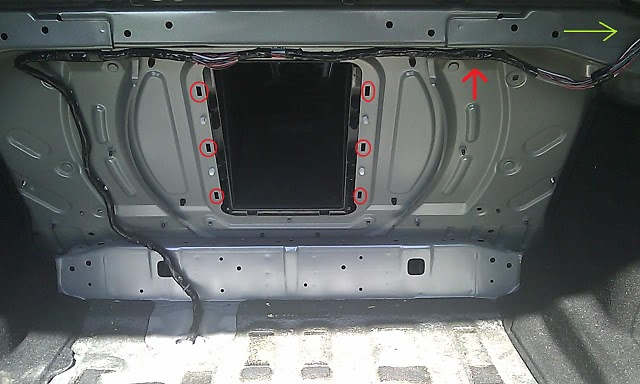
Here’s a better pic of the hole:
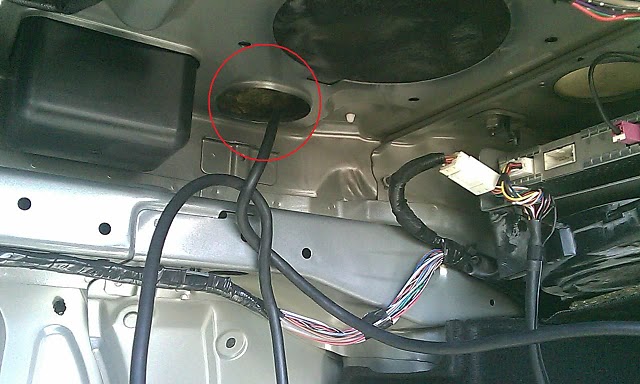
Here’s the XM Y-harness. I unplugged it by myself. It would be easier with a friend to pull the plug out while you hold the unlock down on the plug with a little screw driver.
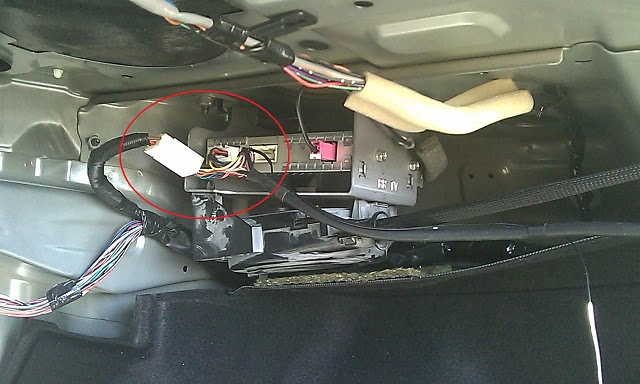
I did have to take out the back seat. There’s two pull tab/rings. Sit in the back seat and put your hand between your legs. Feel around where the seat meets the carpet – that’s about about where the tabs are. Be sure to not pull hard on these, as they are not designed very well. I grabbed the ring with one hand and the seat bottom with the other and jiggled them both until the seat came loose. Next, I unbolted the seat back and lifted it out. Then I snaked the cable through and ran it along the carpet line to the middle of the seat. Instead of cutting the carpet I just ran the cable under the floor mat on the hump and under the center console then under the back of the passenger’s seat. I plugged in the PA15-INFI along with the ipod cable and the 3.5mm and shoved it back under the passenger’s seat for easy access should I need to update some firmware in the future.
I ran the iPod and 3.5mm cable out from under the front of the passenger’s seat and just tucked them under ther center console where the seat would hide them. When I want to plug my ipod in I just pull the plug out from under the center console.
The sould quality of the this PA15-INFI is incredible! With my iPod plugged in it sounds better than the AM/FM, XM, and CD Player. With the volume turned up halfway on both the iPod and the stereo it makes the rear view mirror shake and I can’t hear the person talking beside me. It’s VERY clean and clear sound. Whatever quality the audio is on my iPod is the quality I get from my car speakers.
If you’d like to meet other Infiniti M35 and M45 owners, and learn a lot more about your car, pop in on our Infiniti M35 / M45 Forums!