Cost -$40.
You will need:
assorted screwdrivers
pliers
wire
LED’s with resistors for 12v
a drill with bit the size of your LED
patience
time
electrical tape
soldering iron optional (recommended)
i think that’s it
PUTTING LED’s IN YOUR DOOR LIGHT
1. Disconnect fuse for door lights if you desire.
2. Pry off clear cover with screwdriver
3. Unscrew 2 phillips screws and pull out light assembly
4. Disconnect wiring harness.
5. Drill hole in plastic housing as shown.

6. Tap your LED wires into the positive and negative wires from the original light solder in place.
7. Use electrical tape to insulate everything so you don’t get a short.
8. Push LED into hole that you drilled.
9. Test to make sure it works
10. Put everything back how it was. I left the original bulb in there and the original plug intact so that if I wanted I could go back to stock in 1 minute.
ENJOY!!!!
HOW TO WIRE LED’s INTO YOUR ARMREST
1. Wire all of your led’s to a single cable( diagram is bad but gets the point across)

2. Insulate everything!!
3. Remove door panel.
4. Drill holes once again the size of your LED’s where you want them. Drill from the inside(the cardboard side), and then run the drill through the other side to clean the hole out. I drilled seven an inch apart on the underside.

5. Push your LED’s into the holes you made, and run the wires towards your door hinge.
6. I had my wires exit the hinge side of my door panel between the door and panel, just above the speaker.

7. Figure out how to get your wires inside, I went through the existing hole as shown above.
8. Hook the cables to power and ground, or to a previously installed switch.
I routed my wires under the carpet to my switches


Remember to organize your wires somehow, or they will show or your floor will look WORSE than this:

enjoy your lights!
this is the passenger armrest and door light

WIRING LED’s INTO THE PARKING LIGHT REFLECTORS
1. Remove your parking light assembly
2. Unhook the harnesses, and take out the lamps.
3. Once again, drill a hole the size of your led in the housing wherever you want the led. Before you drill take out the bulb so you don’t break it.
4. Put the led into the hole, and silicon around it so that moisture can’t get in and fog up the light.
5. Wire the LED into the wires going to the bulb if your want it going on with your parking lamps. or wire it elsewhere or to a switch.
6. Insulate everything, and reassemble what you took apart.
Here is where I routed my wires
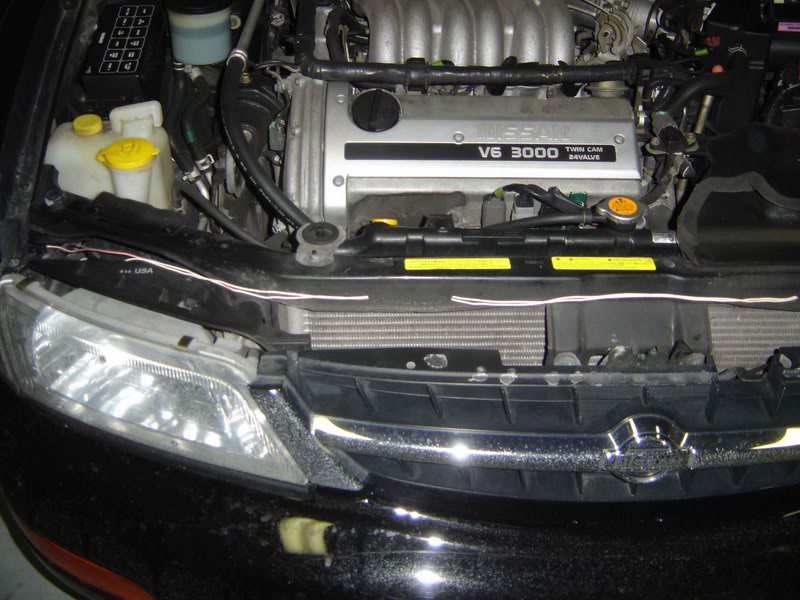

And my grounds for everything

ENJOY!!!

(windshield nozzle lights for reference)
(I put 2 LEd’s in each corner light)
UNDER THE DASH LED’s
1. Same as before
2. For the drivers side, drill holes in drivers side panel under steering wheel
3. For the passenger side, I just shoved the wires up behind the glove box and made them stay with a couple of pieces of electrical tape.
4. Route wires to power and ground.

HOW TO: SWITCHES IN DRAWER UNDER RADIO
1. This is a PITA. Also something that I would not recommend doing. Making the drawer open and close is even harder.
2. I don’t think many people have access to the materials and equipment, but I made a three sided bracket- the side you see, and a side on the left and right to make it stay. I measured the drawer, and used those dimensions. Unfortunately, I don’t have them anymore. I also used the smallest toggle switches I could find, and they barely fit. I routed the wires to and from the switches through a hole I drilled in the back of the drawer, and I almost drilled through the thing that makes it click shut and through the spring. The radio, climate control, and drawer come out as one piece, and then you have to convince the drawer to come out of that. All in all, it takes lots of convincing. Then you have to make the wires exit down somewhere so that they don’t bind and the drawer still opens and closes. I would post a real write up of how to do this, but i don’t know how to explain it and I would have a guilty conscience for recommending this to others.

BTW, I wired all the LED’s except for the door ones to those switches and grounded them to that spot shown above. I powered them by tapping into the cig lighter wire, because it was easy to get to, had its own fuse in the fuse box, and got power only when the key was turned to accessory or further.
Article by danielekfuj